Battery Saver Turns On Too Early? Change the Level
Battery Saver kicks in while you still have plenty of charge left, dimming the screen and slowing background work. The threshold that triggers it is a setting you can change, and manual mode can also keep it stuck on.
TL;DR / Quick Fix
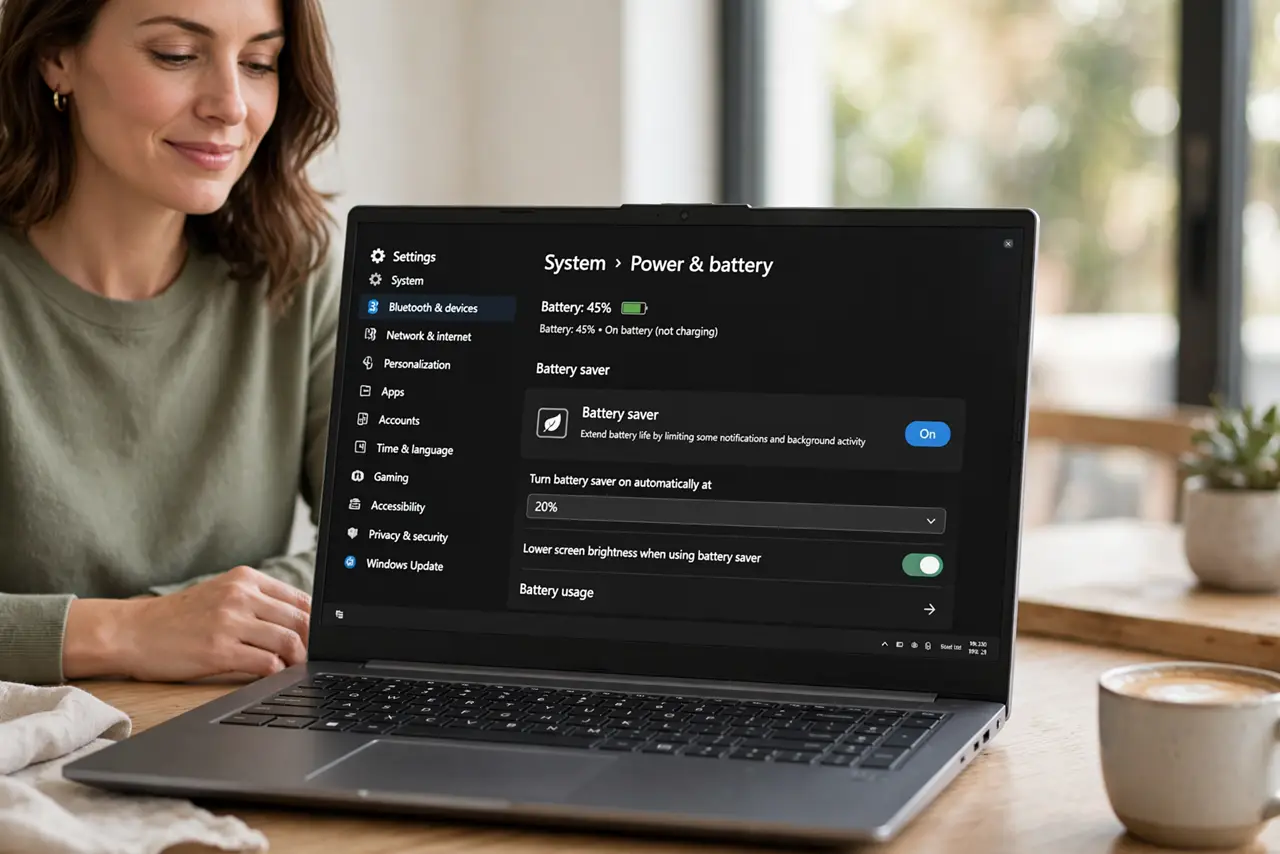
Quick fix: open Settings, then System, then Power and battery, and lower the Battery Saver turn-on level or turn automatic mode off. Also confirm Battery Saver is not switched on manually, then unplug and watch whether it still triggers at the old level.
Follow these steps
- Open Power and battery settings. Open Settings, then System, then Power and battery. This page holds the Battery Saver switch and the level at which it turns on automatically.
- Lower the automatic turn-on level. Find the Battery Saver section and choose a lower percentage, or turn the automatic option off if you prefer to switch it on by hand. A level set too high is the usual cause of early triggering.
- Check manual Battery Saver. Confirm the main Battery Saver switch is off. If it was turned on by hand earlier, it stays on regardless of charge, and it will feel like it triggered too early.
- Check the power mode. On the same page, look at the power mode. A power-saving mode can dim the screen and limit background activity in ways that feel like Battery Saver even when Battery Saver itself is off.
- Unplug and test the new level. Unplug the charger, use the laptop normally, and watch the battery percentage when Battery Saver engages. It should now wait until the level you chose.
- Restart if the old level persists. If Battery Saver still triggers at the old level, restart the computer and recheck the setting. A setting that did not stick after a restart points to a conflicting power plan.
What NOT to do
- Do not disable all power saving to fix an early trigger. Lowering the threshold keeps protection for low battery while stopping the annoyance at higher charge.
- Do not judge the fix while plugged in. Battery Saver only matters on battery power, so test unplugged or you will think nothing changed.
- Do not confuse power mode with Battery Saver. They are separate settings, and changing the wrong one leaves the early trigger exactly where it was.
- Do not leave Battery Saver on manually and wonder why it never turns off. Manual mode overrides the automatic level until you switch it off.
Frequently asked questions
What does Battery Saver actually do?
It limits background activity and lowers screen brightness to stretch the remaining charge. It is useful near empty, but annoying when it starts too early.
Why did it start earlier than before?
The automatic level was probably set high, or Battery Saver was switched on manually and never switched off.
Should I turn automatic Battery Saver off?
Only if you remember to turn it on when charge gets low. Otherwise, pick a lower automatic level instead of disabling it entirely.