iCloud Private Relay? Explained
Your internet provider can see every site you visit — and so can the Wi-Fi owner at the cafe. iCloud Private Relay scrambles that picture for Safari traffic, hiding your identity and your destinations from different parties so no one gets the full story. It is not a VPN, and the difference matters.
TL;DR / Quick Fix
Quick fix: iCloud Private Relay hides your IP address and browsing activity in Safari by routing traffic through two relays — no single party sees both who you are and where you go. Turn it on in System Settings under your Apple ID, then iCloud. It needs an iCloud+ subscription.
Follow these steps
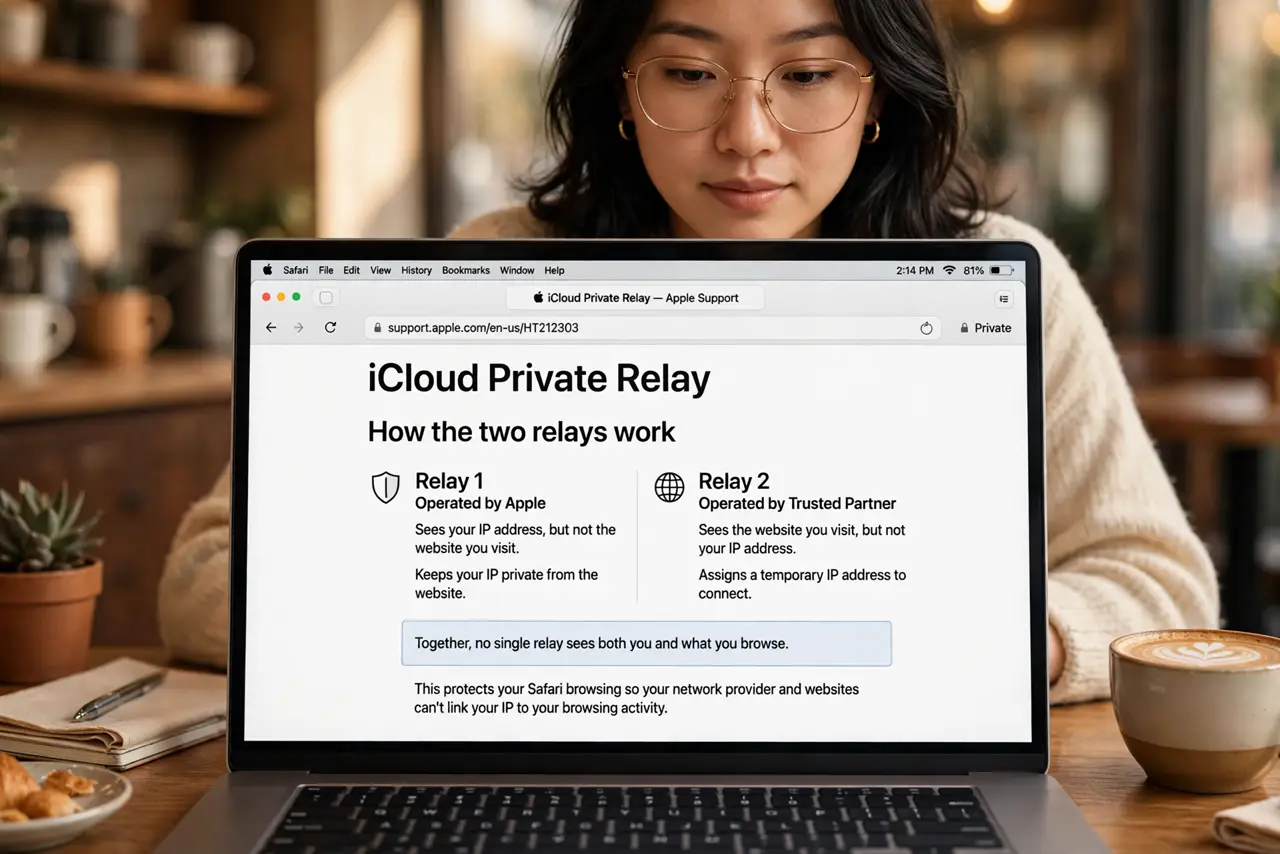
- Understand the two-relay trick. Relay one (Apple) knows who you are but not where you go. Relay two (a partner) knows where you go but not who you are. Neither sees the full picture.
- Turn it on in iCloud settings. In System Settings, click your Apple ID, then iCloud, and enable Private Relay. Choose whether to keep your general location or use a broader one.
- Know it covers Safari, not everything. Private Relay protects Safari traffic and some app traffic. Your other apps and non-Safari browsers send traffic normally.
- Expect occasional site quirks. Some sites show the wrong region's content or ask for extra verification, because your IP looks different. Temporarily disabling it per site fixes this.
- Do not confuse it with a VPN. A VPN hides everything from everyone except the VPN company. Private Relay hides Safari traffic with a split-trust design — narrower, but with no single party to trust.
- Leave it on unless something breaks. For most browsing it is invisible. Toggle it off only for the specific site or network that misbehaves.
What NOT to do
- Do not assume it hides you from Apple. Apple runs relay one — it knows your identity by design; it just cannot see your destinations.
- Do not use it to evade regional blocks. It preserves your approximate region deliberately — it is a privacy tool, not a location spoofer.
- Do not enable it and then wonder why a bank login acts strangely. Financial sites are the most common quirk source — allowlist them.
- Do not confuse it with iCloud+ itself. Private Relay is one iCloud+ feature — the subscription includes it, but they are not the same thing.
Frequently asked questions
Is Private Relay a VPN?
No. VPNs tunnel all traffic through one company that sees everything. Private Relay splits knowledge across two relays and covers mainly Safari — different design, different guarantees.
Why do some sites think I am elsewhere?
The second relay assigns an IP near your general location, not your exact one. Region-sensitive sites may guess the wrong city.
Does it slow down browsing?
Slightly — traffic takes an extra hop. Most people never notice; speed tests may show a small dip.