What Is OFDMA?
Wi-Fi 6 routers advertise OFDMA like a magic speed spell, but your internet feels exactly the same. That is because OFDMA is not about top speed at all — it is about efficiency when dozens of devices chatter at once. Understanding what it actually does tells you whether your home can even use it.
TL;DR / Quick Fix
Quick fix: OFDMA is a Wi-Fi 6 trick that packs small data packets from many devices into one transmission — like carpooling for Wi-Fi. It shines in homes with dozens of smart gadgets sending tiny updates. You need a Wi-Fi 6 router and devices to benefit; otherwise it sits idle.
Follow these steps
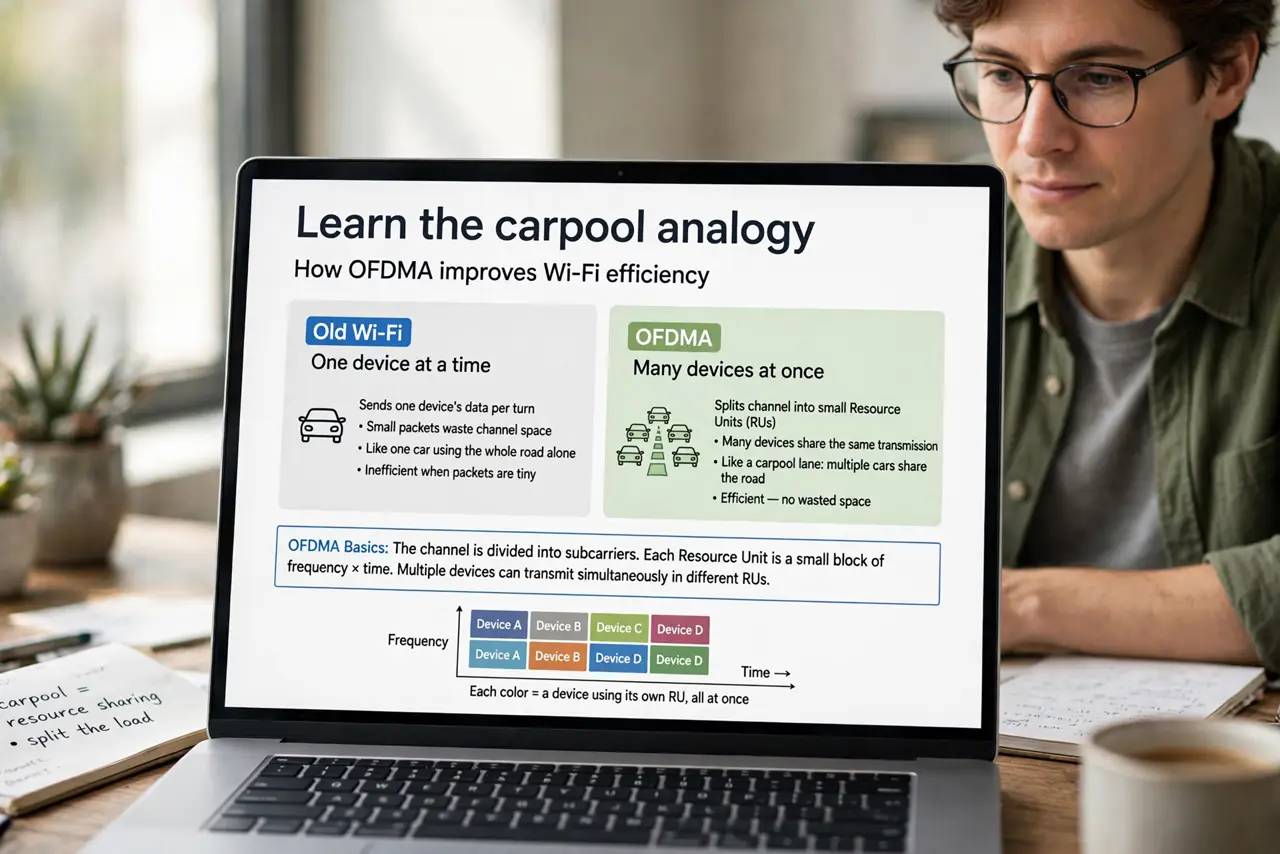
- Learn the carpool analogy. Old Wi-Fi sent one device's data per turn, wasting space on tiny packets. OFDMA splits each transmission into small resource units shared by many devices at once — see the OFDMA basics for the technical shape.
- Know it targets small packets. Smart bulbs, sensors, and thermostats send tiny updates constantly. OFDMA bundles them efficiently — a 4K stream sees little benefit, fifty gadgets see a lot.
- Check both ends are Wi-Fi 6. Router and devices must support Wi-Fi 6 for OFDMA to engage. A Wi-Fi 6 router serving Wi-Fi 5 phones gets no OFDMA at all.
- Do not expect faster top speed. OFDMA improves airtime efficiency under load, not peak throughput. Speed tests will not show it — busy evenings will feel it.
- Pair it with MU-MIMO knowledge. They are complementary: OFDMA carpools small packets, MU-MIMO serves big streams in parallel. Wi-Fi 6 routers typically do both.
- Upgrade for the device count. If your home has 30+ connected gadgets and evenings feel congested, a Wi-Fi 6 router earns its keep. Three devices do not need it.
What NOT to do
- Do not buy Wi-Fi 6 for OFDMA alone. It is one efficiency feature among several — buy for the whole package or not at all.
- Do not expect miracles on old devices. Your Wi-Fi 5 laptop cannot use OFDMA no matter what the router supports.
- Do not confuse OFDMA with more bandwidth. Your internet plan's speed is unchanged — OFDMA just spends the airtime smarter.
- Do not disable it 'to simplify.' It is on by default and harmless — there is no benefit to turning it off.
Frequently asked questions
Will OFDMA make my games faster?
Not directly — gaming cares about latency and stability, which OFDMA barely touches. It helps when many devices compete.
Do I need to turn OFDMA on?
No. It is automatic on Wi-Fi 6 routers — there is nothing to configure.
What's the difference between OFDMA and MU-MIMO?
OFDMA shares one transmission among many small-packet devices; MU-MIMO sends separate full streams to several devices at once.