Send Self-Destructing Email
You need to email a contract or a personal document, and the thought of it living in someone's inbox forever — forwardable to anyone — makes you uneasy. Gmail's confidential mode puts an expiry date and a passcode on the email: after the date it vanishes, and forwarding, copying, and downloading are blocked. It is not encryption, but it is real control.
TL;DR / Quick Fix
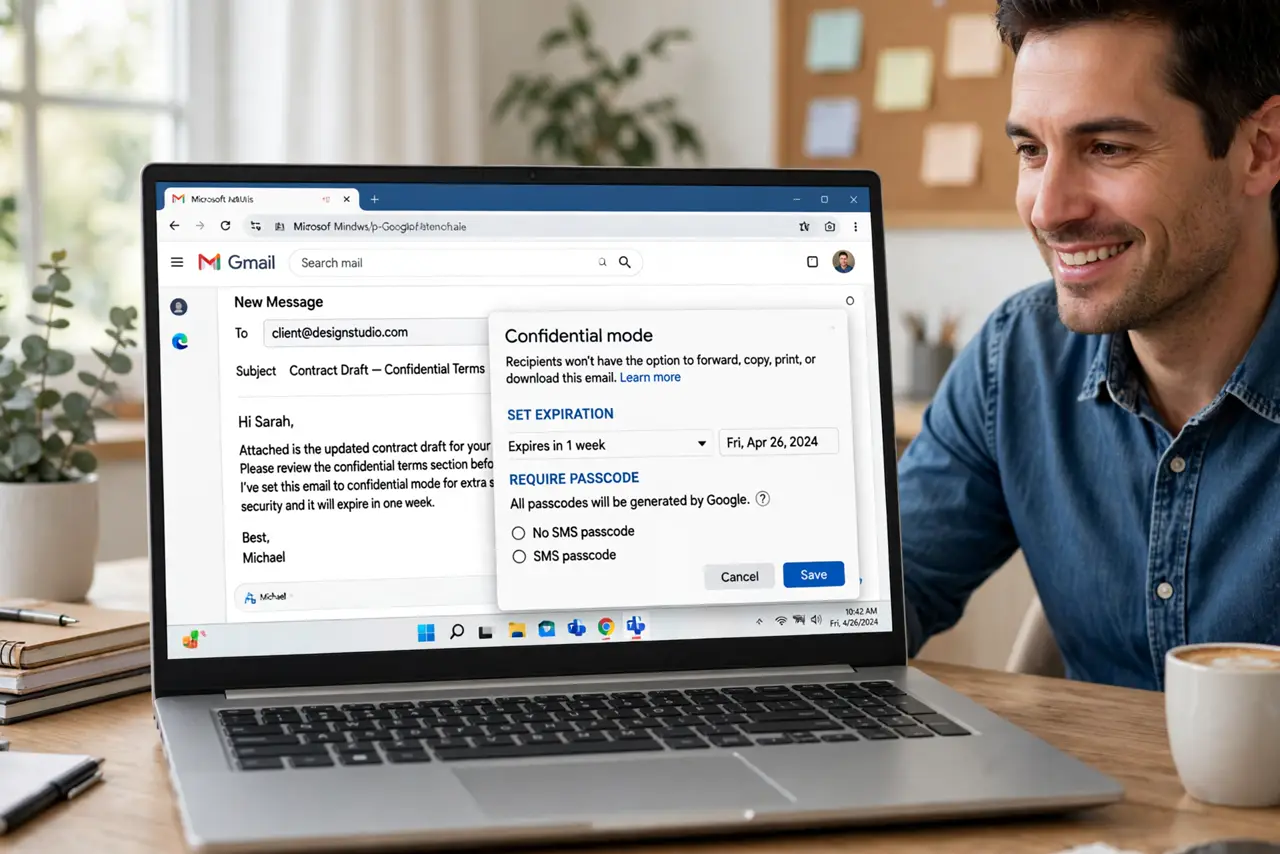
Quick fix: in Gmail compose, click the lock-and-clock icon to open confidential mode. Set an expiry — a week is a good default — and add an SMS passcode for sensitive documents. The recipient gets a link, not the content, and it stops working after the expiry.
Follow these steps
- Compose your email normally. Write the email as usual and attach the document. Confidential mode wraps the sending, not the writing — everything about composing stays the same.
- Open confidential mode. Click the lock-with-clock icon at the bottom of the compose window. The confidential mode dialog appears with expiry and passcode options.
- Set an expiry date. Choose how long the email lives — one day, one week, up to five years. Match the lifespan to the need: a contract review gets a week, not five years. Shorter is safer.
- Add an SMS passcode for sensitive mail. For truly sensitive documents, require an SMS passcode — Gmail texts the recipient a code. This stops casual forwarding cold, since the code goes only to their phone.
- Send and explain. The recipient gets a link and must click through to view. Warn them in the email body — 'this link expires Friday' — so the expiry does not surprise them mid-review.
- Revoke early if needed. Open the sent email and choose Remove access to kill it immediately. Changed your mind about sharing? The kill switch is the feature's quiet superpower.
What NOT to do
- Do not treat confidential mode as encryption. Google can still see the content, and screenshots defeat every protection — it controls forwarding, not determined capture.
- Do not use it for everything. Expiring links annoy recipients; reserve confidential mode for genuinely sensitive documents.
- Do not forget the expiry you set. An expired link mid-negotiation is embarrassing — set calendar reminders for important expiries.
- Do not skip telling the recipient. A mysterious link with no explanation looks like phishing — one sentence of context fixes it.
Frequently asked questions
Can the recipient still screenshot it?
Yes — no email feature prevents screenshots. Confidential mode stops forwarding, copying, and downloading; a photo of the screen always remains possible.
Does the SMS passcode cost the recipient anything?
No — it is a standard text from Google. They just need a phone number you can reach.
What happens after expiry?
The content becomes inaccessible — the link shows an expired message. The email header may remain, but the body and attachments are gone.