Attention Aware Dims Your Screen Too Fast
The screen dims seconds after you look away, even though you are still reading. Attention Aware features watch for your face, and when they miss it, the screen dims as if you left.
TL;DR / Quick Fix
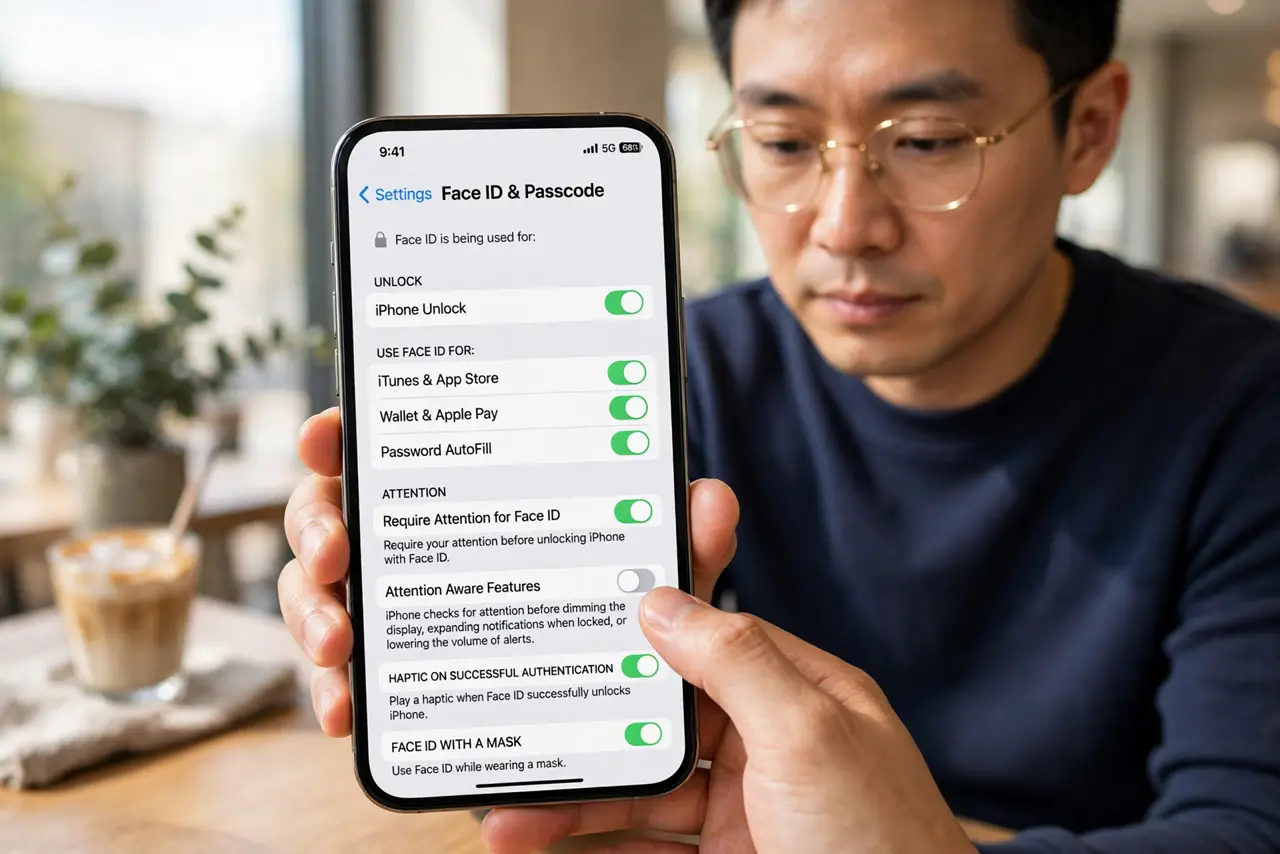
Quick fix: open Settings, then Face ID and Passcode, and turn off Attention Aware Features for a test day. Then lengthen Auto-Lock, and check whether the dimming still rushes in and lengthen Auto-Lock so the screen stays lit while you read comfortably.
Follow these steps
- Turn off Attention Aware Features to test. Open Settings, then Face ID and Passcode, and turn off Attention Aware Features. If dimming slows down, that feature was the cause, and you can decide whether to keep it off.
- Lengthen the Auto-Lock time. Open Settings, then Display and Brightness, then Auto-Lock, and choose a longer time. A short Auto-Lock dims the screen fast even when attention features work fine.
- Check your viewing angle and distance. Hold the iPhone at a normal reading distance and angle. Attention detection misses faces held too low, too far, or at a sharp angle, and dims the screen in response.
- Clean the front camera area. Wipe the front camera and sensor area clean. Smudges there blur the face check, so attention features conclude you looked away when you did not.
- Check for a screen protector problem. A dark or misaligned screen protector over the sensor area can block the face check. If dimming started with a new protector, test without it before changing settings.
- Decide whether to keep the feature off. If turning it off fixes the rush dimming, keep it off. You lose attention-based dimming and volume lowering, but you gain a screen that stays lit while you read.
What NOT to do
- Do not set Auto-Lock to Never to fix fast dimming. That leaves the screen on in your pocket and drains the battery, while a longer Auto-Lock plus attention settings fix it sanely.
- Do not assume the screen is faulty because it dims fast. Attention detection and Auto-Lock together explain most fast dimming, and both are settings.
- Do not turn off attention features and forget why. Note the change, so a future surprise — like louder alerts — traces back to this setting.
- Do not hold the phone at arm's length to test attention. Test at your normal reading distance, since an unnatural hold gives a misleading result.
Frequently asked questions
Why does my screen dim so fast?
Because Attention Aware Features dim it when they miss your face, or Auto-Lock is set very short.
Does turning attention off hurt anything?
It stops attention-based dimming and alert volume lowering, but the phone otherwise works normally.
Why does angle matter?
Because the front sensors need a clear view of your face, and a low or sharp angle hides it.