Haptic Feedback Feels Too Strong on iPhone
Every tap buzzes hard, and the vibration feels more like a jolt than a nudge. The system haptics level and a few per-app settings decide how strong those buzzes feel.
TL;DR / Quick Fix
Quick fix: open Settings, then Sounds and Haptics, and lower the vibration pattern for rings and alerts. Then turn off System Haptics for a test hour, and check whether typing feels calmer and lower alert patterns before turning vibration off entirely.
Follow these steps
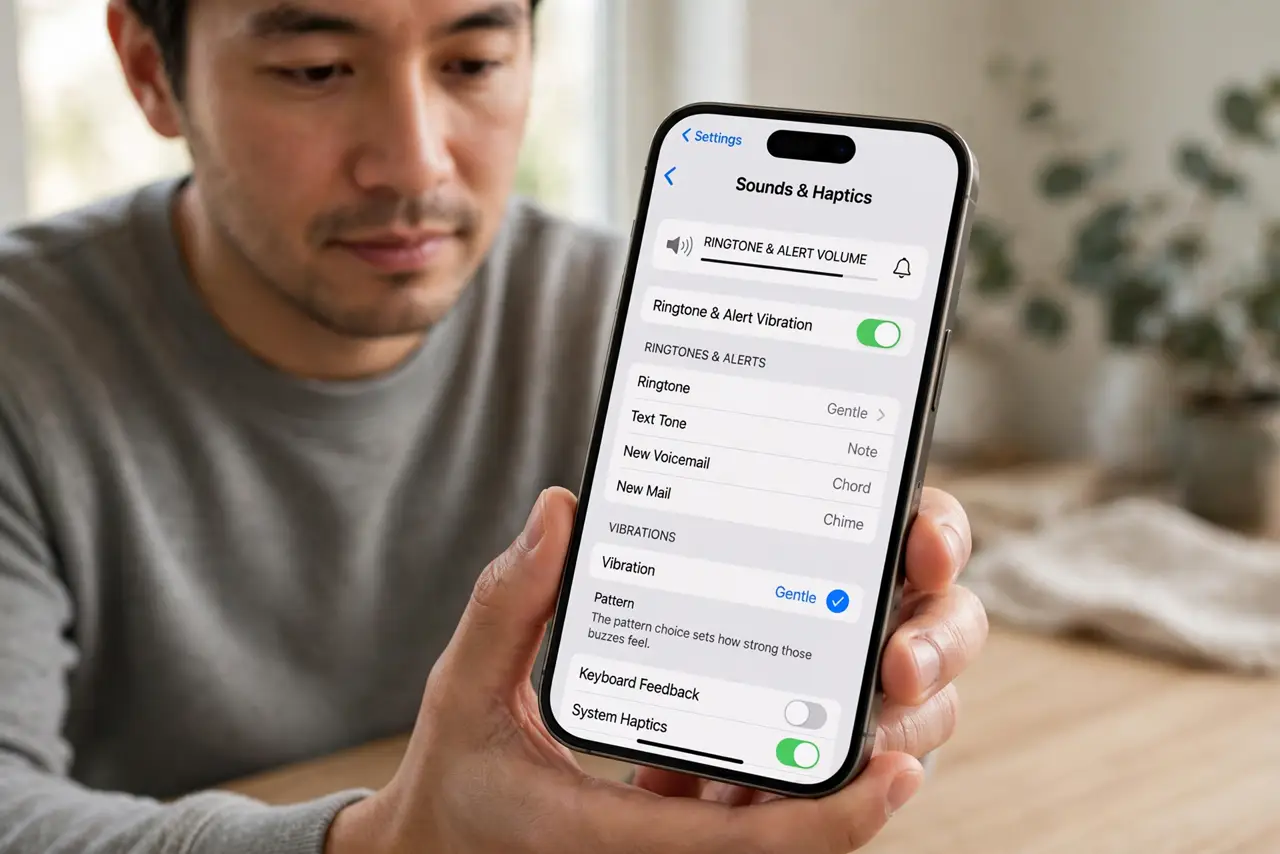
- Lower the ring and alert vibration. Open Settings, then Sounds and Haptics, and choose a gentler vibration pattern for ringtone and alerts. The pattern choice sets how strong those buzzes feel.
- Turn off System Haptics to test. In the same Sounds and Haptics pane, turn off System Haptics. If typing and taps calm down, system haptics were the source of the strong feel.
- Check keyboard haptics separately. Open Settings, then General, then Keyboard, and check Haptic feedback for the keyboard. Keyboard haptics are separate, so turning off system haptics may leave typing buzz unchanged.
- Check the app behind the buzz. If one app buzzes harder than the rest, check that app's own notification and haptics settings. Some apps add their own strong vibration on top of the system one.
- Check the case and surface. A hard case or a phone on a table can amplify a normal buzz into a loud rattle. Test the same buzz while holding the iPhone in your hand to judge its true strength.
- Restart if vibration feels wrong after settings. If vibration stays harsh after lowering every setting, restart the iPhone once. A stuck vibration motor state can make normal haptics feel stronger than they are.
What NOT to do
- Do not turn off all vibration to fix strong haptics. Lower the patterns and system haptics first, so you keep useful alerts at a gentler strength.
- Do not assume a strong buzz means the motor is broken. Settings, patterns, and a hard surface explain most harsh-feeling vibration.
- Do not judge haptics on a table. A table amplifies vibration into a rattle, while the same buzz in your hand feels much softer.
- Do not change every app's settings at once. Fix the system haptics first, then adjust only the app that still buzzes too hard.
Frequently asked questions
Why does vibration feel so strong?
Because the chosen vibration pattern is strong, system haptics are on, or a hard surface amplifies the buzz.
Can I soften typing vibration only?
Yes. Keyboard haptics live in Keyboard settings, separate from system haptics and alert patterns.
Why does it rattle on a table?
Because the table surface amplifies the motor's buzz, making a normal vibration sound and feel much stronger.